
By Dream RC · Beginner Guide · 12 min read · Updated 2026
If you’re a student or hobbyist in Bangladesh trying to start a project — a smart home system, a robot, an FPV telemetry system, or a wireless sensor — you’ve almost certainly asked this question: Arduino Uno or ESP32?
Both boards are available in Bangladesh at similar prices, both are popular in university labs, and both can run a wide range of projects. But they are built for fundamentally different purposes. Choosing the wrong one wastes time, money, and leads to a lot of frustrating dead ends.
This guide is written specifically for the Bangladeshi context — with real prices in BDT, every spec explained in plain language, and a clear decision framework so you know exactly which board to buy for your situation.
“The Arduino Uno taught the world to code hardware. The ESP32 connected that hardware to the internet.”
What Are They?
Arduino Uno R3 is the world’s most popular microcontroller board. Released in 2010, it became the universal starting point for electronics beginners everywhere. It uses an ATmega328P processor, runs at 16 MHz, and has the simplest, most forgiving programming experience of any microcontroller board ever made. Price in Bangladesh: approximately ৳569–650.
ESP32 (WROOM-32) is a dual-core microcontroller with built-in WiFi and Bluetooth, launched by Espressif in 2016. It was designed specifically for the Internet of Things era — anything that needs to connect to the internet, a phone, or another device wirelessly. Price in Bangladesh: approximately ৳499–599 from Dream RC.
The prices are nearly identical. This means the choice is entirely about capability, not budget.
Full Specs Comparison
| Specification | Arduino Uno R3 | ESP32 WROOM-32 | Winner |
|---|---|---|---|
| Microcontroller | ATmega328P | Xtensa LX6 dual-core | ESP32 |
| Clock Speed | 16 MHz | Up to 240 MHz | ESP32 |
| CPU Cores | 1 | 2 | ESP32 |
| Flash Memory | 32 KB | 4 MB (4,096 KB) | ESP32 |
| RAM (SRAM) | 2 KB | 520 KB | ESP32 |
| WiFi | None (needs extra module) | Built-in 802.11 b/g/n | ESP32 |
| Bluetooth | None | Built-in 4.2 + BLE | ESP32 |
| Digital GPIO Pins | 14 | 34 | ESP32 |
| Analog Inputs (ADC) | 6 × 10-bit | 18 × 12-bit | ESP32 |
| DAC Output | None | 2-channel 8-bit | ESP32 |
| PWM Channels | 6 | 16 | ESP32 |
| Operating Voltage | 5V logic | 3.3V logic | Depends |
| Active Power Draw | ~50 mA | ~240 mA (WiFi on) | Arduino |
| Deep Sleep Current | ~15 mA | <10 µA | ESP32 |
| MicroPython Support | No | Yes | ESP32 |
| Beginner Friendliness | Excellent | Good (slightly harder) | Arduino |
| Community Size | Massive (15+ years) | Large & growing | Arduino |
| Price in Bangladesh | ৳569–650 | ৳439–850 | Similar |
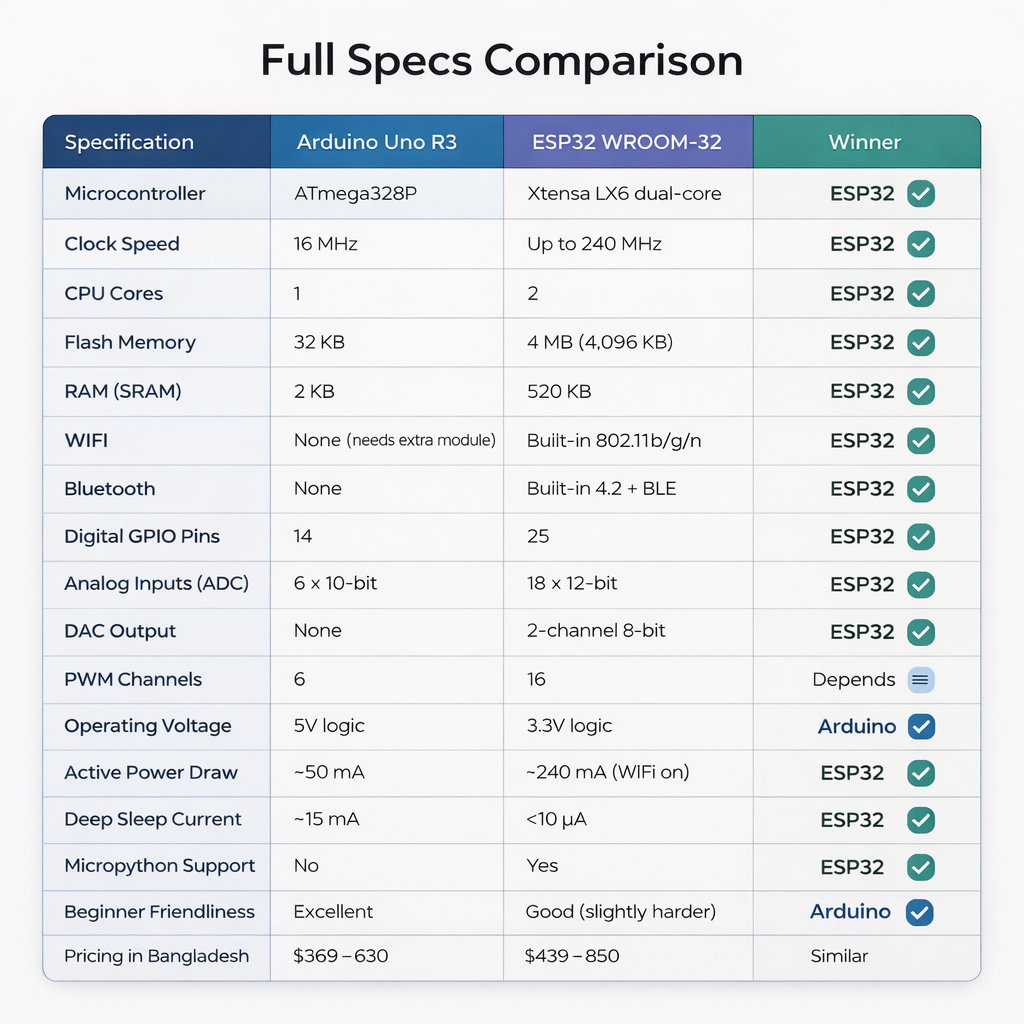
On almost every raw specification, the ESP32 wins. But specs alone don’t determine which board is right for you — the real decision comes down to your project type.
Processor & Speed
The Arduino Uno runs on an ATmega328P clocked at 16 MHz. It handles simple tasks perfectly: reading sensors, controlling motors, blinking LEDs, running sequential logic. But it has firm limits.
The ESP32 uses a dual-core Xtensa LX6 processor at up to 240 MHz — 15 times faster than the Uno, with two cores that can run tasks simultaneously. This matters the moment your project needs to do more than one thing at once — for example, processing sensor data while managing a WiFi connection.
The hidden problem: RAM. Arduino Uno has 2 KB of SRAM. This sounds fine until you try to parse JSON from an API, buffer a display, or handle complex data structures. The ESP32 has 520 KB — over 260 times more. If your project touches networking or displays, the Arduino Uno will quietly run out of memory. The ESP32 won’t.
WiFi & Connectivity — The Biggest Difference
This is where the boards diverge most dramatically. The Arduino Uno has no wireless capability at all. To add WiFi you need a separate WiFi shield or ESP8266 module — adding ৳319–450 in cost, extra wiring, extra complexity, and still not matching the native experience.
The ESP32 has WiFi and Bluetooth built directly into the main chip. This means:
- Connect to your home router and send sensor data to the cloud in 5 lines of code
- Host a full webpage directly from the ESP32 — no external server needed
- Receive phone commands via Bluetooth — no extra hardware
- Build wireless FPV telemetry that sends drone flight data to your ground station
For modern projects in 2026, wireless connectivity is almost always expected. Smart home devices, IoT sensors, remote monitoring — they all need wireless. For these projects, the ESP32 is the clear choice. Using an Arduino Uno for a wireless project means fighting the hardware from day one.
Real example for Bangladesh students: Building a home automation project for your college thesis. With Arduino Uno: extra WiFi module (~৳250), extra wiring, complex AT command code. With ESP32: you call WiFi.begin() and you’re connected. Same project. Half the hardware. Much simpler code. Better marks.
GPIO Pins & Interfaces
Arduino Uno: 14 digital I/O pins, 6 analog inputs. Fine for simple projects, but you run out surprisingly fast as complexity grows.
ESP32: 34 digital GPIO pins, 18 ADC channels, configurable pin assignment for UART/I2C/SPI/PWM. Enormous flexibility for complex builds.
One important caveat: Arduino Uno uses 5V logic. ESP32 uses 3.3V logic. Some older sensors designed for 5V systems need a logic level converter with the ESP32. Most sensors manufactured since 2018 work natively at 3.3V — so this is a concern mainly with legacy components. If you’re using all modern sensors, ESP32 is perfectly compatible.
Power Consumption
Arduino Uno draws ~50 mA in normal operation — low and consistent. ESP32 draws up to 240 mA with WiFi active. For USB or wall-powered projects, this difference doesn’t matter.
For battery-powered sensors, here is the counterintuitive truth: ESP32 deep sleep mode draws less than 10 µA — far lower than Arduino Uno’s sleep current. Design your firmware so the ESP32 wakes up, takes a reading, sends data over WiFi, and returns to sleep in seconds. A small LiPo battery using this pattern can power an ESP32 for weeks or months.
Programming & Software
Both boards use the Arduino IDE. Same C/C++. Same Upload button. Switching from Arduino to ESP32 requires one step: install the ESP32 board package through Boards Manager (search “esp32” by Espressif). Your existing Arduino knowledge transfers almost completely.
cpp
// This blink code works on BOTH boards — identical
void setup() {
  pinMode(2, OUTPUT);
}
void loop() {
  digitalWrite(2, HIGH); delay(1000);
  digitalWrite(2, LOW);  delay(1000);
}
The power is what ESP32 unlocks that Arduino Uno cannot do:
cpp
// ESP32 only — Arduino Uno cannot do this without extra hardware
#include <WiFi.h>
void setup() {
  WiFi.begin("YourWiFiName", "YourPassword");
  while (WiFi.status() != WL_CONNECTED) delay(500);
  Serial.println(WiFi.localIP()); // You're online
}
The ESP32 also supports MicroPython — Python syntax instead of C++. If you know Python from your university courses, you can get an ESP32 project running in minutes. Arduino Uno does not support MicroPython.
⚠️ Warning for beginners: Not all ESP32 GPIO pins behave equally. Never use GPIO 6–11 (connected to internal flash). Safe pins for beginners: GPIO 2, 4, 5, 13–19, 21–23, 25–27, 32–33.
Price in Bangladesh
| Board | Price at Dream RC | What You Get | Verdict |
|---|---|---|---|
| Arduino Uno R3 (Clone) | ~৳569 | Board only, no wireless | Good for beginners |
| Arduino Uno R3 (Original) | ~৳3,999 | Made in Italy | Only if required |
| ESP32 Type-C (30 Pin) | ~৳499 – 599 | WiFi + Bluetooth built in | Best value |
| Arduino Uno + WiFi Shield | ~৳700–900 | Two boards, complex wiring | Poor value vs ESP32 |
For ৳499 — roughly the same as a clone Arduino Uno — you get 240 MHz dual-core processing, 260× more RAM, WiFi, Bluetooth, and nearly 3× the GPIO pins. The value case for ESP32 is overwhelming.
Which Projects Use Which Board?
Use Arduino Uno for:
- First-ever electronics project (complete day-one beginner)
- Simple LED, buzzer, and motor control
- Line-following robots with no wireless requirement
- Projects using legacy 5V-only sensors
- College labs that specifically require Arduino
Use ESP32 for:
- Home automation (phone or internet control)
- IoT sensor networks (data to cloud)
- FPV drone telemetry (wireless flight data)
- Bluetooth RC car or robot control
- Weather stations with online data logging
- Smart door locks and alarm systems
- Web-controlled devices (local webpage from the board itself)
- Battery-powered sensors using deep sleep
- Combat robot wireless control systems
Which is Better for Beginners?
If you’ve never touched electronics in your life: Arduino Uno is the gentler starting point. More forgiving with voltage, simpler pin behavior, and more “complete beginner” tutorials exist for it than for any other board ever made.
If you’ve done even a few Arduino projects: Jump to ESP32. The learning curve is small, the capability jump is enormous.
If you’re a university or diploma student with a semester project: The ESP32’s wireless capability lets you build projects that consistently score better marks. A WiFi-connected sensor system is a more impressive final project than a wired LED counter — at the same price, that advantage is hard to ignore.
Dream RC recommendation: If buying your first and only board, buy the ESP32. It does everything the Arduino Uno does, plus WiFi and Bluetooth, at the same price. The only clear reason to buy the Arduino Uno as your very first board is if your teacher specifically requires it.
Final Verdict
The ESP32 wins for most Bangladeshi students and hobbyists in 2025. It’s faster, has more memory, has built-in WiFi and Bluetooth, more GPIO pins, higher ADC resolution, and costs the same as an Arduino Uno. For any project that connects to a phone or the internet — ESP32 is the right tool.
Arduino Uno still wins in one scenario: the absolute first-time beginner who wants the gentlest, most forgiving introduction to electronics — without WiFi libraries, pin restrictions, or 3.3V logic concerns.
Dream RC recommends: Buy one board — get the ESP32. Teaching beginners from scratch — start on Arduino Uno for two or three projects, then graduate to ESP32. Already know Arduino basics — the ESP32 is waiting for you.
Frequently Asked Questions
Can the ESP32 run Arduino code? Yes. Install the ESP32 board package through Boards Manager, select your board, and your Arduino code transfers almost completely.
What is the ESP32 price in Bangladesh? The ESP32 Type-C (30 Pins) is ৳499 at Dream RC with Cash on Delivery. Delivery inside Dhaka: ৳69 (24 hours). Outside Dhaka: ৳129 (24–72 hours).
What is the Arduino Uno price in Bangladesh? Clone Arduino Uno boards are ৳569–650. Original Arduino Uno (Made in Italy) is ৳3,999–4,800.
Is ESP32 better than Arduino for college projects? For most Bangladesh college projects, yes. WiFi-connected and wireless projects score better and are more impressive to evaluators. At the same price, ESP32 gives you significantly more to show.
Can ESP32 be used for FPV drone telemetry? Yes. The ESP32 is widely used for wireless FPV telemetry — sending altitude, GPS, battery voltage, and RSSI from drone to ground station. Many open-source FPV telemetry systems are built specifically for ESP32.
Does ESP32 work with 5V sensors? With caution. ESP32 GPIO pins are 3.3V logic and not 5V tolerant. For 5V sensors, use a bidirectional logic level converter. Most sensors since 2018 work natively at 3.3V and connect directly.
| Board | Best For | Buy Link |
|---|---|---|
| Arduino Uno | Beginners, learning electronics | Buy Now |
| ESP32 Type-C (30 Pins) | IoT, robotics, smart devices | Buy Now |
| ESP32 38 Pin | Advanced projects, more GPIO | Buy Now |
Shop ESP32 (৳499) and Arduino Uno at dream-rc.com — COD available, ships from Bangshal, Dhaka.
Also read: What is Arduino? Complete Beginner’s Guide for Bangladesh Students · ESP32 for FPV Drone Telemetry · Build a Smart Home System with ESP32 in Bangladesh